CRM for medical centres
CRM for clinics: every enquiry accounted for
Website enquiries, WhatsApp and calls in one workspace for receptionists. Patient reminders go out automatically, and you can see where patients come from and who returns.
for the basic pipeline: enquiries, bookings, reminders
for full implementation, including data migration and customisation
patients in the CRM we built for the clinic GlazoLik
Already have a CRM, but still using a notebook? Tell us, in a few words, how you manage bookings — we will identify what gets in the way.
Why a clinic needs CRM
While enquiries stay in WhatsApp and notebooks, the clinic cannot see how many patients it loses
CRM does more than produce reports. It closes four gaps through which patients and revenue slip away.
One patient — from the first call to a return visit
-
Enquiries get lost
A message arrived in the evening, a call at lunchtime. Neither was followed up the next morning.
With CRM
Each enquiry becomes a record with an owner and a deadline. If nobody replies, the system sends a reminder and the manager sees the overdue task.
-
Unclear which ads pay off
Ads generate enquiries and the till records revenue, but there is no link between them.
With CRM
Each enquiry has a source; each patient record shows attendance and payment. Budgets follow patients, rather than clicks.
-
Patients do not return
Check-ups and the second stage of treatment are only remembered if the patient calls.
With CRM
CRM creates a reminder task for the right day or sends a message automatically. A return visit costs less than acquiring a new patient.
-
Patient contacts leave with the employee
Patient contacts are stored on the receptionist’s personal phone.
With CRM
The clinic owns the database. A new employee opens a profile and sees the patient’s full history.
Medical information system or CRM
The medical information system handles clinical care; CRM supports the patient before and after the appointment. A clinic usually needs both
Managers ask whether CRM can replace a medical information system. It cannot: they serve different purposes.
-
Medical information systems, including 1C-based systems
Used by the doctor
Electronic medical records, appointments and prescriptions, medical documents, statutory reporting.
-
CRM
Used by receptionists and the call centre
Enquiries and bookings, calls and messages, reminders, patient sources, return visits and management reports.
-
Together
How we connect them
CRM shows whether a patient attended and what they paid, using till data or an export from the medical information system. Direct integration is discussed separately: we check which data your system can provide.
Two systems — one patient
This is how we connected the till in GlazoLik’s old system to Bitrix24 enquiries: the clinic can see which ad brought a patient who attended and paid.
How we implement it
First, bookings and enquiries in 2–3 weeks. We add the rest once the team is comfortable
A CRM built over half a year and launched all at once rarely takes hold. We roll it out in stages.
- 1Review the booking processWho handles enquiries, where the schedule lives, what gets lost. A conversation with the manager and receptionist.
- 2Launch enquiries and bookingsPipeline, doctor calendars, reminders, website and WhatsApp in one workspace. 2–3 weeks.
- 3Migrate data and connect the tillImport patient histories and match enquiries to payments, so you can see who attended.
- 4Train and refineWe train staff on real enquiries and remove obstacles. Full implementation takes 2–4 months.
How to choose a clinic CRM
Eight questions before buying any CRM
A popular system without clinic-specific setup often stays empty: receptionists keep using notebooks. Check that it covers what you actually need.
What we usually recommend
Bitrix24 customised for the clinic: it covers most of this list and costs less than building from scratch. We add custom features for specialist workflows, such as an eye clinic’s surgery day.
Bitrix24 for clinicsBookings in the doctor and room calendar
With service durations, a waiting list and repeat bookings.
WhatsApp and telephony in one workspace
Receptionists reply from CRM, rather than their personal phones.
Patient profile
Search by phone or individual identification number, with enquiry, visit and document histories.
Enquiry source
Website, ad, call or referral — recorded automatically.
Reminders
Appointment reminders for patients, callback reminders for receptionists.
Access permissions
Receptionists and doctors see their own information; the manager sees everything.
Reports without Excel
Enquiries, bookings and attendance by source and doctor.
The clinic owns its data
The entire database can be exported; it is not tied to the contractor.
Case study · GlazoLik, Karaganda
GlazoLik’s enquiries and till records lived in separate systems. We connected them to show which booked patients attended and paid
Advertising brought enquiries into Bitrix24, while appointments and payments went through the clinic’s old CRM.
- Built an eye clinic CRM: patient profiles, visit history, surgery registers and till records
- Enquiries with advertising tags are matched to till records nightly by phone number
- Calls automatically create enquiries with a source; forms on lasic.kz and katarakta.kz feed into one pipeline
- Patients receive a WhatsApp message when booked; colour shows the status: booked, confirmed or did not attend
GlazoLik records in CRM
nightly reconciliation190 000
appointments and 83 thousand patients in CRM — ad enquiries matched to payments
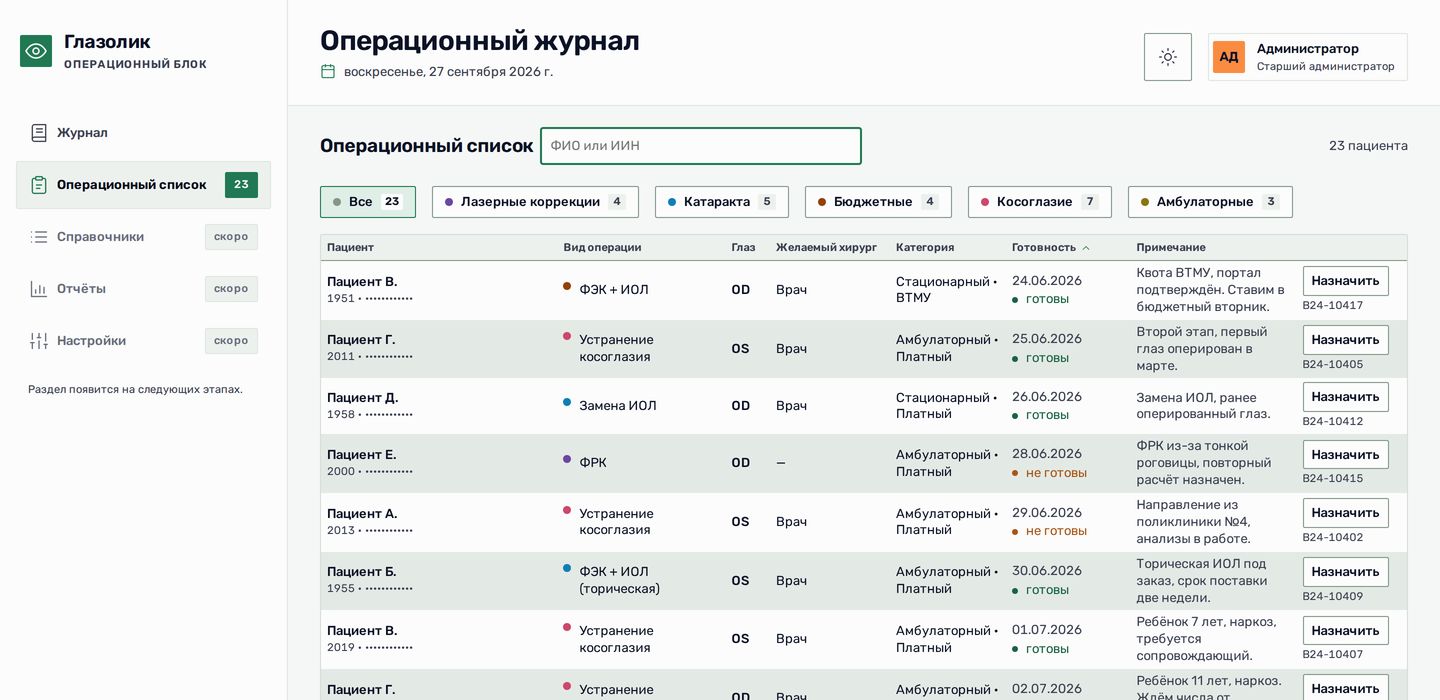
One database instead of two: see which ad brought a patient who attended and paid.
How much does a clinic CRM cost?
Two parts: the software licence — for example, a Bitrix24 plan, paid directly — and our implementation work. The work depends on the number of channels, data migration and customisation. We send an estimate after a short enquiry.
How long does implementation take?
Enquiries, bookings and reminders take 2–3 weeks. Full implementation with data migration, till integration and customisation takes 2–4 months. The clinic starts using CRM after the first stage.
Will CRM replace our medical information system?
No. The medical information system handles clinical care: records, appointments and documents. CRM supports patients before and after their appointments. We connect the systems using data exports so CRM shows whether the patient attended.
Our receptionists will not use it
They will if CRM is faster than a notebook. We start with what helps them: WhatsApp and calls in one workspace, booking in a couple of clicks. Reports and customisation come later. Training uses real enquiries, rather than a manual.
Can you migrate our old database?
Yes. At GlazoLik, we moved the full appointment history into a shared patient database. We review your current data format, remove duplicates and migrate it.
Who owns the patient database?
The clinic does. The database lives in the clinic’s system and can be exported in full at any time.